

“One bat, one finger,
seven seconds on the air”
(Click, the microphone goes live. This post turns one FingerMaster round (Level 1) into a sports-broadcast script. The caster’s and analyst’s lines are made up; the times, rules and on-screen wording in each “Source check” box come straight from the game’s source.)
Hello and welcome to the FingerMaster round live broadcast. It’s a short one. The first level lasts about 6.8 seconds, and in that window the level banner, the countdown, the main event, the clear screen and the item pick for the next round all go by. Let’s slow a round that is over in a breath down to broadcast speed.
Before the start · level banner and countdown
#1 Opening · the night sky
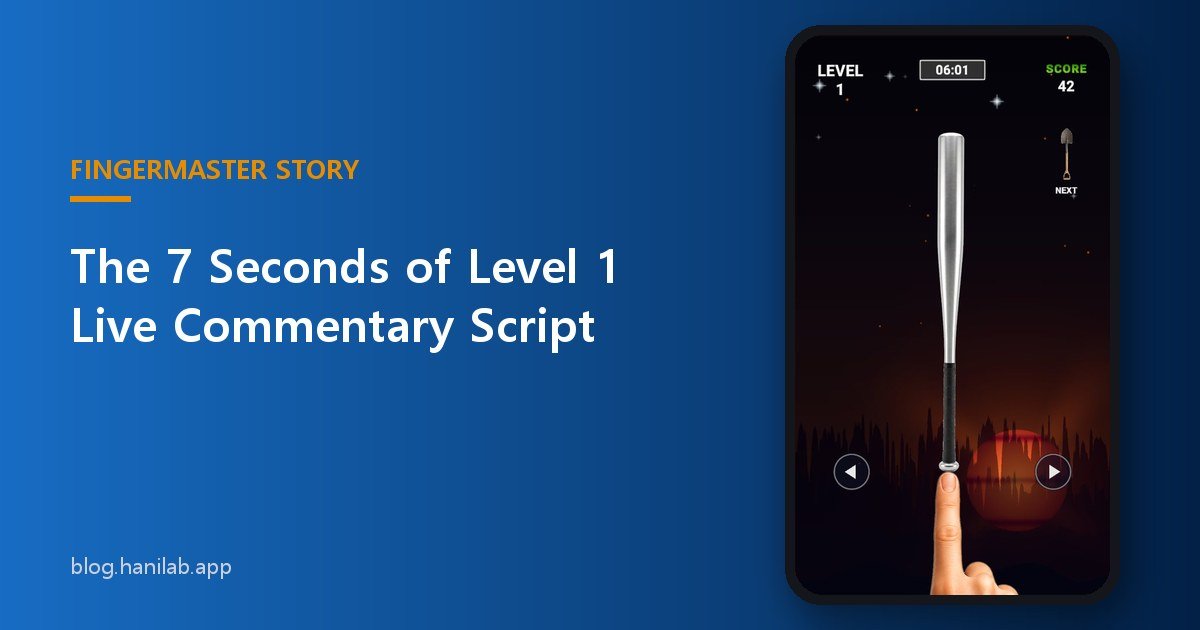
(A dark sky, a glowing red sun low on the horizon, and white “LEVEL 1” text sitting in the middle.)
Caster Another night at the arena, folks. “LEVEL 1” has just appeared on screen.
Analyst The letters don’t arrive all at once. Measured from the center, the left-hand letters slide in from the left and the right-hand letters from the right. The HUD, with its score and timer, stays hidden for the whole intro.
 Level banner: the text splits from the center, slides in from both sides, then fades out.
- The “Level ” + number text slides in from both sides over 0.5 seconds, stays for about 1.22 seconds, then fades out over 0.28 seconds.
- The HUD is hidden while the banner shows. Even when weather or a special mode is active, there is no banner text for it: you have to notice it with your own eyes.
#2 The countdown
(A hand rises, and a silver bat stands on the fingertip. A big blue 3 swells and fades.)
Caster Three, two, one. The number floats up in blue, and the bat is still standing politely.
Analyst Don’t be fooled. During the countdown it just rests on the hand. The moment the numbers finish, physics switches on and the bat starts leaning a little to one side or the other. Leave it alone and it slowly topples.
 Countdown at 3: the number is a blue gradient, and the bat is only resting on the hand for now.
- After the level banner there is a 1.5-second wait for the hand and the object to appear; when 3 → 2 → 1 ends, the object gets a random left or right initial angular velocity.
- For the first 5 physics frames after the start, the tilt check is held off.
The main event · seven seconds of finger work
#3 Main event · balancing
(The time on top, the score on the right, the level on the left. The bat is drifting to the right.)
Caster The bat is leaning right! Where do you press?
Analyst On the side it leans toward. Press the right half of the screen and the hand moves right; press the left half and it moves left. Lift your finger and it stops at once. There’s no inertia, so the speed is always the same.
 When the bat leans right, the hand chases it to the right. The round arrows at the bottom are just guides.
 Now it’s the left. You only ever press one direction at a time, so that’s the entire control scheme.
- If the touch lands left of the horizontal center of the screen, the hand goes left; if right, it goes right. Release and it stops (no inertia, no acceleration).
- The two round arrows at the bottom are for show; the input comes from touching either half of the screen.
- During a round the bottom bar is hidden. It only appears on the clear screen, game over and home.
#4 Main event · the combo stretch
(The bat stands almost vertical. A blue “COMBO x1” and the hand’s name appear in the middle of the screen.)
Caster There it is, “COMBO x1” in the middle! And underneath it says “Man Finger”.
Analyst That’s the sign the bat has stayed nearly upright for 0.8 seconds. Keep it standing and the combo climbs one step every 0.8 seconds. Drift past the reference angle and the step count drops back to 0, though the points already earned stay.
 Keep the bat standing straight and a “COMBO x” readout appears in the middle. The “NEXT” slot at the top right previews the object for the next round.
- Hold a tilt within ±5° for 0.8 seconds and that’s step 1. Keep holding and a step is added every 0.8 seconds; going outside 5° resets it to 0 (points already earned are kept).
- The readout has three lines, “COMBO xN / hand name / +points”, and from step 10 up it switches to the “Fever” wording.
- This post doesn’t go into the detailed score calculation.
#5 Highlight · the action stretch
(The hand scurries left and right. The bat wobbles on the edge of falling.)
Caster It’s wobbling! It’s wobbling! The hand won’t rest!
Analyst The rule for falling is simple. Past 75° from vertical, it’s over right there. Just keep up with it before that.
After the whistle · the clear and the next pick
#6 Final whistle
(The timer reads 00:00 and the bat has stopped, standing. “LEVEL 1 / Clear!” appears in the middle.)
Caster Time! “LEVEL 1 Clear!”
Analyst The final score comes up, and there are two buttons: a pink [BRAG IT!] and a green [NEXT]. From this moment the bottom bar is back.
 The clear screen: a pink [BRAG IT!] and a green [NEXT], with the bottom bar reappearing from here on.
#7 Interview room · getting ready for the next round
(Press [NEXT] and a popup appears: a list of six items and a blue button below.)
Caster The match is over, but there’s one choice left. It says “Choose an item to use”.
Analyst Six lined up: Revive, Stop3, CLEAN, Wall, Speed and Turtle. Pick one, or head into the next round with the [Start without item] button at the very bottom. For what each does, see the item post. All you need to remember here is that this popup comes up after a clear, before the next round.
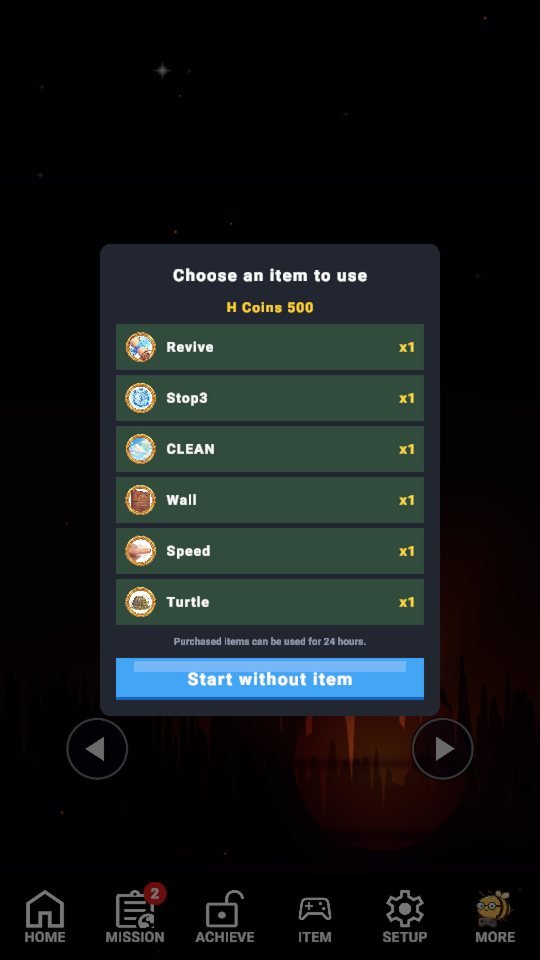 The item-choice popup just before the next round. The blue button at the bottom is [Start without item].
- Clear → [NEXT] → (a bonus coin round if the level is a multiple of 10) → item-choice popup → next level. If the bat falls, the game-over screen appears 0.8 seconds later.
- There is no limit on lives.
(Sign-off music. The caster sets down the microphone.)
In a little over seven seconds, the banner, countdown, balancing, combo, clear and item pick have all gone by. Next time on the air: Level 2, under the same night sky.

Play FingerMaster now
Playing it is much faster than reading about it.
Find the other Master Series games all in one place at hanilab.app.

More from this game
 Where does your FingerMaster score go after a fall? Retry, New Game and mercy rounds Q&A
 FingerMaster hazards with no warning: 9 of them, from lightning and ghost to earthquake and strobe
 FingerMaster weather and special modes — measuring the hazards that come with no warning
 FingerMaster Perfect Combo — How One Round’s Score Swells, and What a Single 5° Costs
🌌 Universe stories
 Roddy Universe, Part 2 — Fallen Down, Only One Step Back at the Roadside
 Roddy Universe, Part 1 — One Beat Before Crossing, the Empty Road Between the Cars
 Bombi Universe, Part 2 — Behind You: The Reaper That Walks Through Walls
Try other games
 FlipMaster
 WordMaster
 TapMaster