


One arm to go,
six seconds on the clock
(A snowy forest. Robert and Margaret stand side by side while the screen slowly turns red. This post plays out the moment the timer runs dry in four short scenes. The lines are made up; the numbers in each “Rules of this scene” box and the on-screen text come straight from the game source.)
A PoseMaster time limit changes the whole screen as it runs low, and Add Time and Continue each hand back something very specific. Here is exactly what, told as a script. Timers only start at level 11, so you will not have seen any of this in your first ten rounds.
Snowy forest · the clock turns red
S#1 Snowy forest · Level 12 · 6 seconds left
(Behind the two of them, the blue and green block outlines are drawn. Both are still standing at attention. The timer bar is almost empty.)
Robert My dear, the sign up top is shouting at us. “Hurry up!”
Margaret Six seconds? I can barely raise one arm in that.
 6 seconds left: the edges go red and “HURRY UP!” appears.
- When the time left reaches 8 seconds, “HURRY UP!” pops up once. From then on a warning beep sounds every second and the time pill pulses.
- The vibration also starts at 8 seconds, once a second, and gets stronger from 3 seconds. You can tell how much is left with your eyes closed.
- There is no time limit on levels 1-10; timers begin at level 11. The length varies with each round’s number of people and minimum moves.
Add Time · ten seconds to breathe
S#2 Same forest · the bottom button row
(The player’s finger taps the second slot from the left on the bottom row, the hourglass.)
Robert The clock is winding back. Quick, arm up!
Margaret Breathe first, dear.
 “TIME +10s”: the 6-second clock is now at 16.
- It adds 10 seconds to the time left. The amount is
10 + level ÷ 25, so it creeps up with the level, somewhere between 10 and 18 seconds. - The warning also restarts from the new time. If it drops below 8 seconds again, “HURRY UP!” shows up again.
- The base price is 30 H coins at level 1. If you have none in stock it is bought with coins and used on the spot. The count you own is the blue badge at the top right of the button.
- On a level with no timer (levels 1-10), tapping it shows “No time limit on this level” and the item is not used up.
Time Up · and Continue
S#3 Same forest · the clock hits 0
(This is a round where the item was saved for later. The clock hits 0 and the round freezes. A dark window opens in the middle.)
Margaret Oh dear, is that it?
Robert Three buttons, I see. Retry, Continue, and Continue again.
 “TIME UP”, BEST 78%. Below it: RETRY, Continue (ad), Continue 60 H.
(The finger presses the blue button. The two of them hold the very same pose, and only the clock has swung part of the way back.)
Margaret Oh, we’re still standing right where we were.
 Right after Continue: same poses, and the clock is back to 13 seconds.
- When time hits 0 you get “TIME UP”, and below it the score of your worst-matched piece that round, shown as “BEST N%”.
- Continue keeps your poses as they are and puts the time left back to at least half of the time limit. If more than that was already left, it stays as it is.
- Continuing with coins costs 60 H at level 1, and the price doubles each time within the same round (the second is 120). The ad Continue button only shows when an ad is ready.
- A round where you used Continue skips the interstitial ad once it is over.
S#4 Cherry blossom path · Level 4 · another day, out of moves
(Today the trouble isn’t time but moves. The same window opens with just a different title.)
Margaret The clock is perfectly fine this time?
Robert It says we ran out of moves.
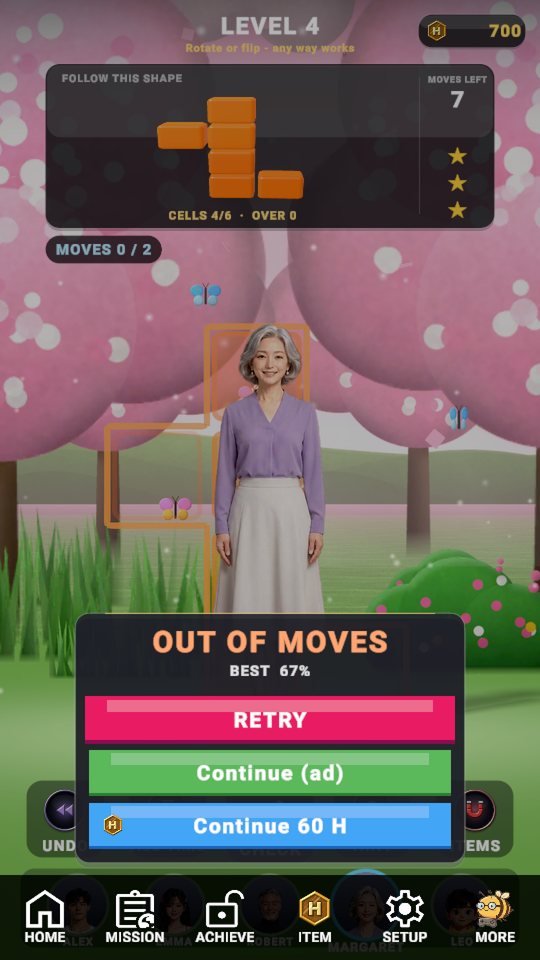 “OUT OF MOVES”, BEST 67%. Move limits start at level 4 and the buttons are the same.
- Move limits start at level 4, and using them all up brings “OUT OF MOVES”.
- Here Continue gives back not just time but extra moves equal to the minimum (at least 3).
(The curtain falls. The clock is ticking again, and each of them raises one arm.)
The warning comes at 8 seconds, Add Time gives ten, Continue gives back half the clock. Learn the numbers and the star of the final scene isn’t the clock but your own finger.

Play PoseMaster now
Playing it is much faster than reading about it.
Find the other Master Series games all in one place at hanilab.app.

More from this game
 What Changes in PoseMaster as Levels Rise? A 6-Question Interview with Margaret
 PoseMaster Daily Check-in, Missions and Shop: A One-Day Play Diary
 Why You Lose: 7 PoseMaster Mistakes That Leave You Stuck
 PoseMaster 3 Stars Explained: Par, Move Limit and PERFECT Time Formulas
🌌 Universe stories
 Roddy Universe, Part 2 — Fallen Down, Only One Step Back at the Roadside
 Roddy Universe, Part 1 — One Beat Before Crossing, the Empty Road Between the Cars
 Bombi Universe, Part 2 — Behind You: The Reaper That Walks Through Walls
Try other games
 FanMaster
 BurstMaster
 WingMaster