

Team Done Button vs. Team Wait
Two Ways to End One Round
(Two microphones in the booth. The commentators put two players side by side and talk through how each one finishes the same round. The dialogue is made up; the rules and numbers in each ‘In the game’ box come straight from the game’s source.)
The SliceMaster Done button is what you press after drawing your lines, but you don’t actually have to press it. If you lift your finger and wait, the game wraps the round up for you. This post puts a button-presser and a hands-off waiter into the same round and walks through the difference as a broadcast script. One of the differences touches your score directly.
Broadcast Opens · Same Starting Line
S#1 Booth · just before the round
(A level banner fills the middle of the screen. Both players sit in front of the same round.)
Play-by-play Here’s today’s round. Player A presses the button when finished; Player B lifts the finger and waits.
Analyst When a round starts, the banner comes first. Until it fades and the object appears, there’s nothing to touch.
 Start of a round: the banner appears first, then the object.
- Level banner 1.5 s → object appears → 3 · 2 · 1 (3 s) → the input phase opens.
S#2 Booth · countdown
(The number ticks down. A finger hint hovers near the object.)
Play-by-play Three, two, one. At the starting line the two players are identical.
 3 · 2 · 1 — when the last number disappears, the input phase opens.
Input Phase · The Hands Are Exactly the Same
S#3 Booth · drawing
(Both players swipe the same way. A glowing trail sweeps across the object.)
Analyst You can’t tell them apart so far. You draw a straight line, and if you bend it, each bend adds another line.
Play-by-play But the trail vanishes the moment the finger lifts?
Analyst Yes. It glows while you draw and disappears when you let go, and the actual cuts are applied all at once after input ends. You only see the result once it’s over.
 The trail glows only while you draw. It disappears when you lift your finger.
- Draw a straight line with your finger anywhere on the screen. If you bend it by 35 degrees or more, each bend confirms another line (a Z-shape makes 3).
- Very short segments (under 0.15 world units) are ignored.
- Cuts are applied all at once after input ends.
The Fork · Done Button vs. Waiting
S#4 Booth · Player A’s hand
(Player A, lines all drawn, glances to the top of the screen. A blue button glows and pulses.)
Player A All drawn. Done.
Play-by-play Pressed! The input phase ends right there.
 The blue Done button near the top of the input phase. This is Player A’s finish switch.
S#5 Booth · Player B’s hand
(Player B lifts the finger and rests both hands on the knees. The booth starts to buzz.)
Play-by-play Player B isn’t pressing the button, just sitting there. Giving up?
Analyst Not at all. If you’ve drawn at least one line fewer than the target and then stay hands-off for 1.5 seconds, the game treats it as if you’d pressed Done. It’s there so someone who doesn’t know about the button doesn’t lose the time bonus.
Play-by-play But there’s a condition, right?
Analyst Yes. With too few lines, the automatic finish doesn’t kick in. And it doesn’t check whether the pieces came out right. It only counts lines and ends the round.
- ① The time limit runs out. ② You press the Done button (it appears 1.2 s after input opens). ③ Automatic: draw target pieces − 1 lines or more, lift your finger, and 1.5 s passes.
- Neither the Done button nor the automatic finish checks whether the pieces are right; the round just ends. The verdict comes afterward, in the result sequence.
- Drawing a new line or touching the screen restarts the 1.5 s count from zero.
S#6 Booth · the two side by side
Analyst Let’s put it in a table.
| Player A · Done button | Player B · Waiter | |
|---|---|---|
| When it ends | The instant the button is pressed | 1.5 s after lifting the finger |
| What it needs | The button must be up (after 1.2 s) | Lines drawn ≥ target pieces − 1 |
| Piece count check | Neither does it — the verdict comes in the result sequence | |
| Time bonus | Both: remaining seconds (rounded down) × 1000 | |
| If you use the whole time limit | Both get a time bonus of 0 | |
Play-by-play So the whole gap is 1.5 seconds. Can 1.5 seconds turn into points?
Analyst It can, because the time bonus is the remaining seconds, rounded down, times 1000. Say Player A presses with 11.9 seconds left: that’s 11,000 points. If Player B lifted at the same moment, the game ends 1.5 seconds later with 10.4 seconds left, so 10,000. Waiting 1.5 seconds can cost you 1,000 to 2,000 bonus points. Those numbers are made up for illustration.
- Score = (target pieces × 100 [+ 200 for a special object] + time bonus) × grade multiplier (× 2 if you use the DOUBLE item).
- Time bonus = remaining seconds (rounded down) × 1000 on an early finish. 0 if under 1 second is left. A round that ends because time ran out gets 0.
- The 3-second item adds +3 s to the time limit, and the time bonus grows by the same amount.
The Verdict · Same Result Sequence
S#7 Booth · replay
(The moment it ends, the screen changes. Both players’ rounds play out in the same order.)
Play-by-play Going to the replay. Whether it ended by button or by waiting, from here on you can’t tell them apart.



- Cut playback → tense pause → pieces spread → numbers 1 · 2 · 3 … in turn → 1 s → success / failure.
- It’s a success when the piece count exactly matches the target and the largest piece’s area ÷ the smallest piece’s area is within the allowed ratio.
S#8 Booth · the time bonus line
(Once all the numbers are in, a blue line appears at the bottom of the screen.)
Analyst This line is the punchline of today’s comparison. It’s the remaining seconds times 1000. If Player A and Player B finish the same round with the same lines, this is the only number that differs.
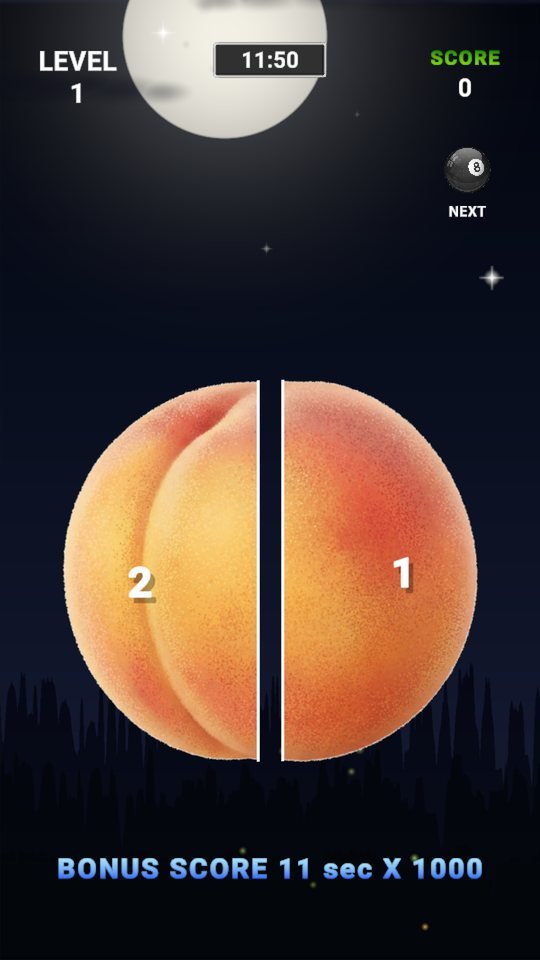 The bonus score line at the bottom: remaining seconds (rounded down) times 1000.
Play-by-play Sum it up for us.
Analyst If you’re sure you’re done, press the button. If you’ve drawn everything but you’re busy and can’t reach the button, just lift your finger and the game presses it for you 1.5 seconds later. If you want to save every point, the button is 1.5 seconds faster.
(Broadcast over. The two players shake hands.)
Press the button or lift your finger and wait, the verdict is the same. But every second you wait is a second off the clock, and each remaining second is worth 1,000 points.

Play SliceMaster now
Playing it is much faster than reading about it.
Find the other Master Series games all in one place at hanilab.app.
More from this game
 SliceMaster First Run: Why the Line Vanishes When You Lift, in 5 Steps
 SliceMaster Bottom Bar: A Guidebook to the 6 Tabs, HOME to MORE
 15 s at Level 1, 10 s at Level 100, x0.45 at Level 400: SliceMaster Difficulty in Numbers
 Why Does the Broom Only Appear at Level 52? The SliceMaster Object Pokedex
🌌 Universe stories
 Roddy Universe, Part 2 — Fallen Down, Only One Step Back at the Roadside
 Roddy Universe, Part 1 — One Beat Before Crossing, the Empty Road Between the Cars
 Bombi Universe, Part 2 — Behind You: The Reaper That Walks Through Walls
Try other games
 FanMaster
 BurstMaster
 WingMaster