

One frame is 0.05 seconds
Reading bonuses and lightning
The hardest thing to catch in a WingMaster guide video is "when exactly did that change?" This WingMaster guide puts three scenes shot at 20 frames per second next to frame strips as moving pictures, and shows how to read the game’s time values by converting them into frame counts. One thing up front: the bird on screen is flown by a capture autopilot, not by a person.
Converting seconds into frames
The footage was shot at 20 fps, so seconds x 20 = frames. Here are the main times from the source converted (I did the math; the source itself has no frame values).
| Event | Source value | Frames | Where it comes from |
|---|---|---|---|
| Lightning strike after the warning band | 0.85 s | 17 | Storm lightning rule |
| Obstacle reaction time | 0.85 s | 17 | Difficulty default |
| Bonus subtitle appears | 1.95 s after start | 39 | Bonus intro effect |
| Zone-clear background spin | 1.15 s | 23 | Zone effect |
| Item duration | 7 s | 140 | Item rule |
| Bonus Time | 8-10 s | 160-200 | Depends on the type |
Coin Rush – banner, subtitle, combo
The moving picture below covers 3.4 seconds of Coin Rush. In the first frame you can see a faint line across the sky, "Coins pour in. Grab them all!", which is the Coin Rush subtitle. The thin bar at the very top is the time left, and the combo counter climbs from x8 to x22 across the strip.
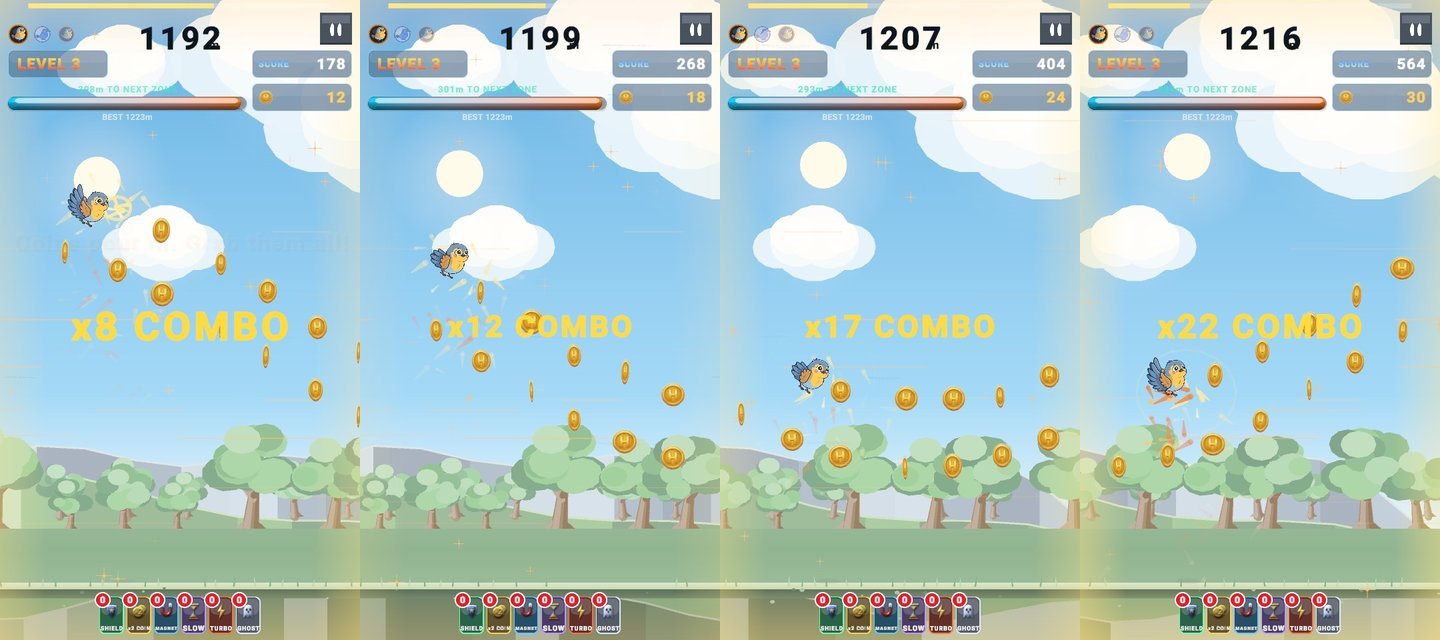
Over those 2.75 seconds (frame 0 to frame 55) the score rose from 178 to 564, while the distance grew by only 24 m. Most of the score comes from coins multiplied by the combo, not from distance. The coin count went from 12 to 30, about 6.5 per second by my math. The combo gains +1 per coin up to 50, the multiplier is 1 + 0.10 x combo, and it only holds if you chain coins within 2.6 seconds.
Gold Gates – the path coins draw
In Gold Gates, 8 coins form a ring 2.4 across, and the rings alternate high and low. In the footage the pigeon keeps weaving between the rings while the combo climbs from x19 to x38. Following the rings up and down in the same posture is the point to watch. (In this take, the first frame carries a faint "STRONG WIND" line from the weather, which is not part of the bonus.)
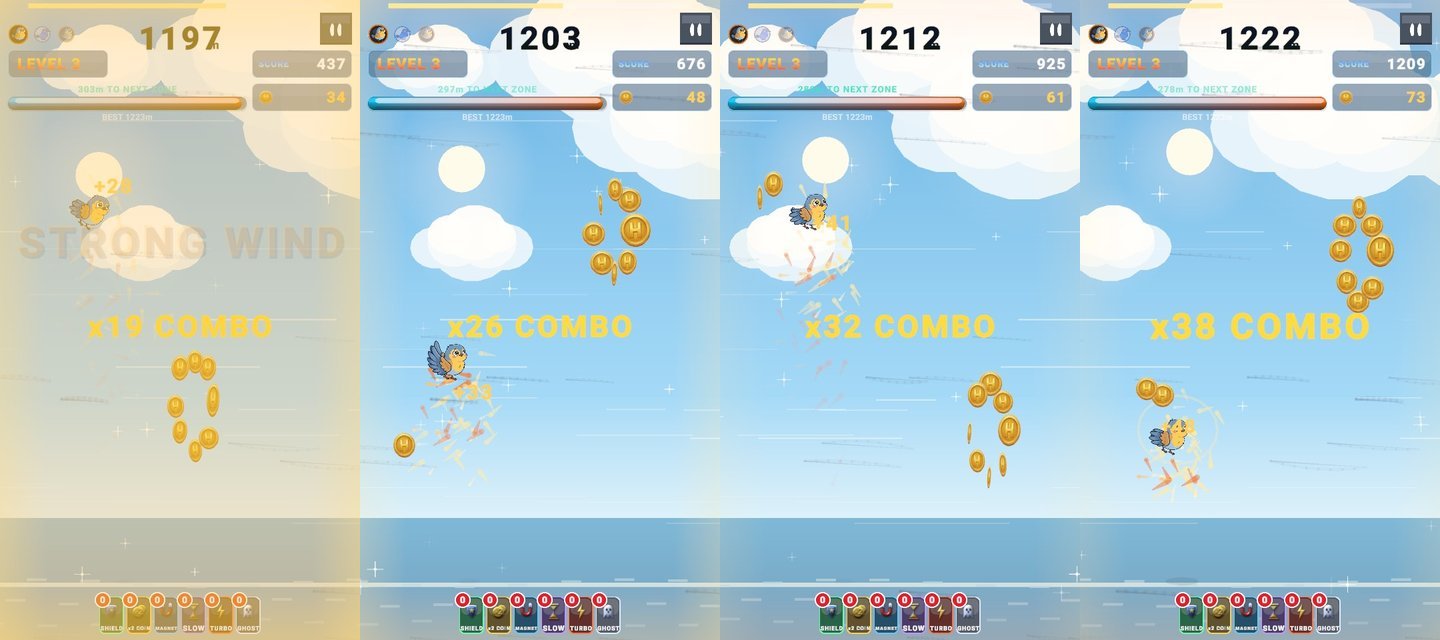
Coins went from 34 to 73, +39 in 2.75 seconds, about 14 per second – a much faster pile-up than in Coin Rush above.
Telling the 8 bonuses apart on video
| Type | Length | Obstacles | What to look for |
|---|---|---|---|
| Coin Rush | 8 s | Paused | Two-line coin bundles rise and fall |
| Coin Wave | 9 s | Paused | Sine-wave coins |
| Gold Gates | 10 s | Paused | 8-coin rings alternating high and low |
| Feather Storm | 8 s | Paused | Scattered at every height like rain |
| Wind Sprint | 10 s | Normal | Speed x1.3, score x2 |
| Golden Time | 10 s | Normal | Coins x3 |
| Zero Gravity | 9 s | Paused | Gravity x0.55 |
| Ghost Party | 9 s | Normal | Ghost feather on automatically for 7 s |
In the bonuses where obstacles stay Normal (Wind Sprint, Golden Time, Ghost Party), pillars and obstacles keep coming, so they are easy to spot. The paused ones leave only coins and birds. Ghost Party switches on the ghost feather for 7 seconds right at the start and lays coins for only the first 4 seconds, so the screen turns violet and the coins run out early.
Lightning – is it too late once you see the warning?
Lightning strikes only in the Storm environment, and only when the rain is heavy enough. A warning band appears, and the bolt lands 0.85 seconds (17 frames) later. A hit is instant death; only the flamingo’s single shield or the ghost feather can stop it. The moving picture below is a flamingo flying through a storm: rain, a tornado, a "DANGER AHEAD" banner, the warning band, and then the bolt itself.
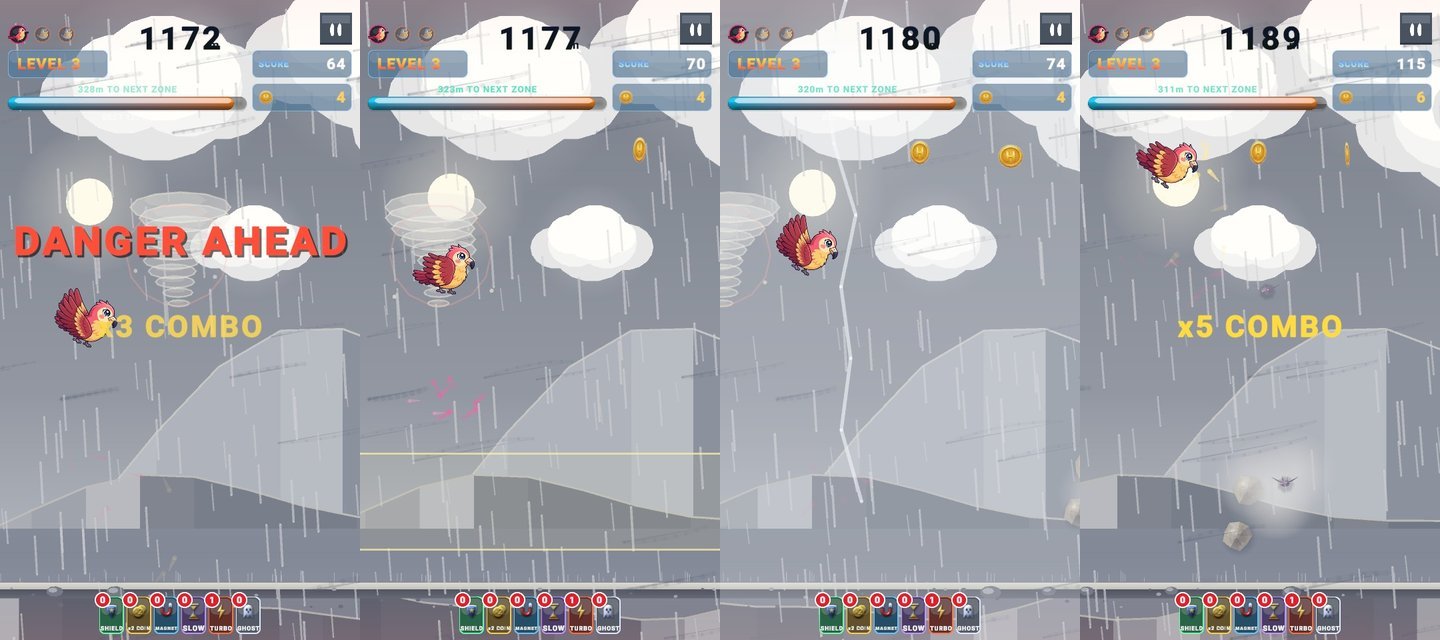
This scene was shot with lightning forced on, so it says nothing about real frequency. The real rule is that the first bolt comes 4-9 seconds after the storm begins, then every 6-12 seconds. The Storm environment itself only appears after 3,500 m, so you need to travel quite far to see lightning on video. Counting the sheet I made (every 4th frame), the band shows up around frame 4 and the bolt around frame 20, roughly 16 frames apart – close to the 17 in the rule.
- Gauge time in the order banner -> subtitle 1.95 s later -> the bar shrinking.
- In stretches where obstacles pause, like Coin Rush, not breaking the combo is nearly all of the score.
- With lightning you have only 0.85 seconds to move once the band shows, so settle on your next position before it appears.
Reading danger by reaction time
Lightning’s 0.85 seconds equals the default obstacle reaction time. The difficulty is designed on the principle that you should be able to dodge within 0.85 seconds of seeing the warning. When practicing with video, pause on the frame where the warning appears, check the new position and the safe height, then count whether you can reach that height within 17 frames. Also remember that one flap overwrites your speed to 9.6, so the gap between taps cannot be shorter than 0.085 seconds.
Each obstacle has its own warning time. The source values are raptor 0.9 s, boulder 0.8 s, helicopter 0.7 s, rock and fireball 0.6 s, and ice 0.5 s. At 20 fps that is 18, 16, 14, 12 and 10 frames. Count from the moment the warning mark shows on an obstacle in the video and you can tell at once which one is tighter.
| Obstacle | Warning time | Frames at 20 fps |
|---|---|---|
| Raptor | 0.9 s | 18 |
| Boulder | 0.8 s | 16 |
| Helicopter | 0.7 s | 14 |
| Rock · Fireball | 0.6 s | 12 |
| Ice | 0.5 s | 10 |
What’s easy to miss when watching bonuses
- The banner changes twice – first a big "BONUS TIME!" with the name, then a one-line subtitle 1.95 seconds later. The moment you read the subtitle you know the rule.
- A number shows at the end – when the bonus finishes, "BONUS COMPLETE +N" shows the coins earned.
- Patterns stop – during Coin Rush, Coin Wave, Gold Gates, Feather Storm and Zero Gravity, no terrain patterns spawn. If the pillars suddenly stop appearing in a video, that is the sign you are in one of these bonuses.
- Dying cancels it silently – if you fall mid-bonus, it vanishes with no ending text.
How to read the numbers on screen
At the top of the video are the distance (the big number in the middle), the score (chip at top right) and the coins (the chip below it). The score is the sum of distance x 1 + seconds alive x 2 + 10 per coin x combo multiplier + near-miss bonus, so when the distance barely moves but the score shoots up, as in the Coin Rush scene above, you are in a combo-coin stretch. Conversely, if only the distance climbs while the score barely moves, it is ordinary flight. Comparing just two or three numbers tells you which kind of stretch you are in.
The thin bar beside the level chip at top left is the distance left to the next zone, and "BEST …m" below it is your best record. How that record sets the multiplier for item values is covered in the item price post.
When you film your own
If you plan to record a run and make a guide video yourself, knowing the rules makes it look much better. Keep the scenes connected from start to finish. The first bonus comes at around 650-850 m, so starting the recording just before that is the most efficient. To catch lightning you must reach the Storm environment past 3,500 m, so be ready for a long run.
- The first 300 m is the tutorial and has little danger. It makes a good opening scene.
- Capture the first bonus around 650-850 m.
- The next bonuses come every 1,000-1,600 m, so keep going and collect the types.
- Capture lightning in the Storm environment after 3,500 m.
The scenes as one story
Watch the three scenes in a row and you can see the rhythm of a WingMaster run. First you pass the 300 m tutorial, and the first bonus opens at around 650-850 m. After a bonus ends, the next one is held back at least 700 m, so the stretch between is plain flying where you catch your breath. Each time you clear a zone (500 m) the background spins once for 1.15 seconds and the objective reward coins come in.
Bonuses never overlap a hard stretch or a rest stretch. They will not start during a hard section, or until 70 m have passed since a zone began. So even when a bonus banner seems to pop up suddenly in a video, it is actually picking the calmest gap.
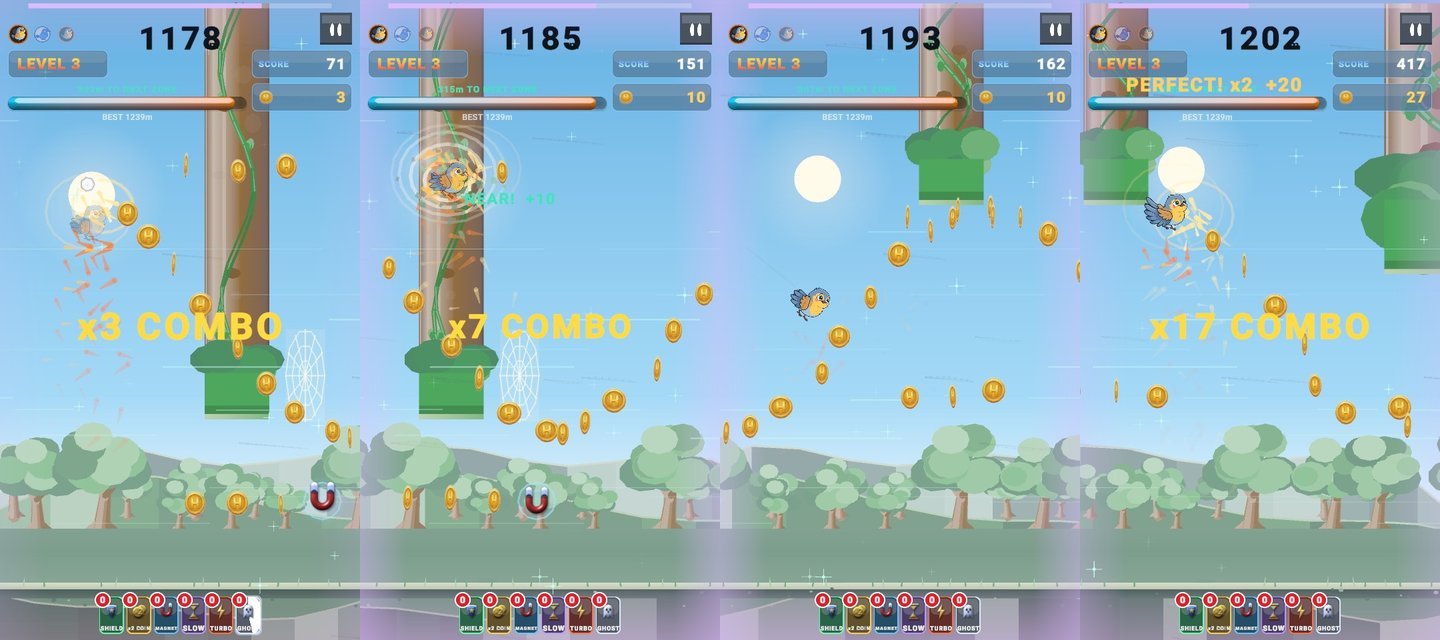
The bonus types unlock as you go farther. Before 1,000 m only the first four (Coin Rush, Coin Wave, Gold Gates, Feather Storm) appear, Wind Sprint and Golden Time open around 1,400 m, Zero Gravity around 1,800 m, and after that Ghost Party completes the 8. All three scenes above sit near 1,170-1,230 m, but that was forced at capture time, so I’ll say it again.
When you watch a guide video, the top bar and the banner alone tell you which bonus it is. Coins rising and falling in two lines mean Coin Rush, a sine-wave shape means Coin Wave, rings mean Gold Gates, and a rain of scattered coins and feathers means Feather Storm. In Zero Gravity the bird floats along, and in Wind Sprint the background rushes by and the score climbs at double speed.
Tips for the 8 bonuses
Last, a short note on what to watch for in each type.
- Coin Rush (8 s) – coins come in two-line bundles; don’t change height much, follow the middle of the bundle and the combo won’t break.
- Coin Wave (9 s) – the sine shape makes rhythmic tapping important. Check whether the tap gaps are even in the video.
- Gold Gates (10 s) – 8 coins per ring. The height you must pass through alternates high and low.
- Feather Storm (8 s) – coins scatter at every height like rain and 14% of them are gold. It pays not to give up on the high ones.
- Wind Sprint (10 s) – speed x1.3, score x2. Obstacles are normal, so you have fewer frames to react than usual.
- Golden Time (10 s) – coins x3, and it multiplies with the x2 coin item. Obstacles stay normal as well.
- Zero Gravity (9 s) – gravity drops to x0.55 and the bird floats. Tapping too much can send it into the ceiling.
- Ghost Party (9 s) – the ghost feather turns on for 7 seconds and coins are laid for only the first 4. You pass through obstacles, so just focus on the coins.
All of these times are source values, and in real footage they can be off by a frame or two. I could not confirm from the code whether the opening effect (the banner) counts toward the length.
Sound and vibration in the video
Some information is missing if you only look at the screen. The source says a bird cheer, vibration and a dedicated background track come with the start of a bonus. I could not confirm whether the lightning sound comes before the warning band shows, but if the video has sound on, it is a clue alongside the visual warning. Even a muted video lets you read the situation from the top bar, the banner and the combo number.
In short, watch a video in this order: (1) check the top bar to see whether it is a bonus, (2) read the coin flow from the combo number, (3) compare the score chip and distance number to guess the stretch, and (4) count dangers like lightning from the warning frame. Done this way, the same video gives you something new on a second look.
If you want to make a guide video yourself, caption each scene with one or two numbers, for example "lightning warning 17 frames". You can use this post’s conversion table as it is.
Frequently asked questions
Q. Can you dodge lightning in the video?
A. You must leave the strike position within 0.85 seconds after the warning band shows. Rather than moving the bird a long way up or down, it is far more reliable to already be at a safe height before the warning shows. The flamingo has a one-time shield, and with the ghost feather on, lightning passes through you as well.
Q. Is missing a bonus a loss?
A. A bonus is a chance to boost coins and score at once, so missing one is a pity, but the biggest loss is dying, which cancels it silently. Playing it safe comes first.
Q. What about video that is not 20 fps?
A. The game caps one frame at 0.05 seconds, so if your phone records at 60 fps, 3 frames make one step. The conversion table here is for 20 fps; recompute with seconds x fps for your own video.
An example of reading the moving pictures in order
Let’s practice reading the three moving pictures above in order. First, Coin Rush. In the first frame the score chip shows 178, the coin chip 12, and the combo reads x8. In the last strip frame the score is 564, the coins 30 and the combo x22. Coins rose by 18 in 2.75 seconds, about 6.5 per second. This is a figure I calculated from the values read off the frame strip.
Next, Gold Gates. The score went from 437 to 1,209 and coins from 34 to 73. With 39 more coins in 2.75 seconds that is about 14 per second, piling up faster than Coin Rush. But the two scenes use different birds and the autopilot moved differently while shooting, so I can’t conclude that one bonus is better than the other.
Finally, the lightning picture. This scene has almost no coins, but it has danger. The score went from 64 to 115 and the distance from 1,172 to 1,189. That is 17 m in 2.35 seconds (frame 0 to frame 47), about 7.2 m per second. Reading numbers like this for each scene shows how different the character of the same three seconds can be.
The core of this reading method is comparing the numbers in a scene’s first and last frames. WingMaster always shows the score, coins and distance at the top, so it pairs well with video guides. When reading numbers from video, using the values at the start and end of a scene gives smaller errors than the value of a single moment passing by. Putting a frame strip alongside lets you read the numbers while still, which is even more accurate. Once you build the habit, you can compare other people’s guide videos by the numbers too. The biggest advantage is that even without sound you can work out a scene’s speed and coin flow from numbers alone. Try watching just 3 seconds of each scene and writing down two numbers. After about ten scenes you get a natural feel for which stretches stack coins well.
One more note: a frame strip picks four frames from the same scene and joins them side by side, so the time gaps within the scene are not even. They are picked loosely at the 0th, 15th, 35th and 55th frames (the lightning strip uses the 0th, 12th, 22nd and 47th), so when comparing numbers, use the values in the caption under the strip. All scenes were shot on an English-language screen, and bird and bonus names are written as the game shows them. Keep these two promises in mind when reading a video guide and misunderstandings are rare. When a number I read looked doubtful, I replayed the moving picture, and if I still wasn’t sure I chose not to use it.
Finally, once more: 20 fps is a capture setting. On a real device the frame interval depends on the screen refresh rate, but the game’s time values are in seconds, so the seconds in the conversion table stay valid.
Every time value in this post is a constant from the source, and the frame counts are converted at 20 fps. If you are curious about a number, multiply it yourself.
- I could not find the address of the main YouTube video in the source or in older posts, so it is not included.
- The bird on screen is the capture autopilot, not a person’s hands.
- The distance where each bonus started was forced for the capture, so it differs from the real start distance (650-850 m).
One frame is 0.05 seconds,
and a paused video becomes numbers.

Play WingMaster now
Playing it is much faster than reading about it.
Find the other Master Series games all in one place at hanilab.app.

More from this game
 WingMaster Item Timing: The Seven Auto-Trigger Conditions and Five Moments to Press Yourself
 WingMaster Item Prices: Your Best Record Raises the Cost of a Shield Feather
 WingMaster Guide: All 8 Bonus Times, the 5 That Stop Obstacles and the 3 That Don’t
 WingMaster Bird Unlock Guide: Levels 1 to 100, 3x Trial for Locked Birds and Bird Growth
🌌 Universe stories
 Roddy Universe, Part 2 — Fallen Down, Only One Step Back at the Roadside
 Roddy Universe, Part 1 — One Beat Before Crossing, the Empty Road Between the Cars
 Bombi Universe, Part 2 — Behind You: The Reaper That Walks Through Walls
Try other games
 TapMaster
 BlockMaster
 SnakeMaster